Templated fields
Templating is a powerful feature that lets you build re-usable task configurations with user-supplied inputs. Define inputs under a top-level template block, then reference them with {{ <variable_name> }} in place of the actual value. This is particularly useful for model IDs, column names, and other values that may vary between runs. to avoid hardcoding values in the task file and then having to create multiple task files for different values.
Templated variables are inserted into the task at task runtime after the project has been created. The only exception to this is the model_slug field which can be specified either at project creation time or at task runtime.
Where templating is supported
Templating is supported for a range of simple and domain-specific field types. The sections below show how to define a template input for each supported type.
string
Use a string template when you want a free-text value. You can optionally enforce a pattern using a regular expression and provide a default.
template:
  run_label:
    label: "Run label"
    type: string
    default: "baseline"
    pattern: "^[a-z0-9_-]+$"
boolean
Use a boolean template for simple on/off switches.
template:
  test_run:
    label: "Test run"
    type: boolean
    default: false
number
Use a number template for numeric values, with optional lower bound and a default.
template:
  top_k:
    label: "Number of top predictions to return"
    type: number
    minimum: 1
    default: 5
array
Use an array template when you need the user to supply a list of values, for example multiple labels or column names. Specify items.type: string, and optionally minItems and a default list.
template:
  include_labels:
    label: "Labels to include"
    type: array
    items:
      type: string
    minItems: 1
    default:
      - "cat"
      - "dog"
Nested string arrays (one extra level, i.e. a list of lists of strings) have limited support - must be set at the project level and not by the end user at task run time. Set items.type: array and nest another items block whose type is string:
template:
  code_groups:
    label: "Code groups"
    type: array
    items:
      type: array
      items:
        type: string
    minItems: 0
    default: null
The array type supports strings, and has limited support for nested arrays of strings (one extra level).
file_path
Use a file_path template to open the user's file explorer and let them select a file, constrained by extension where appropriate.
template:
  input_csv:
    label: "Input CSV file"
    type:
      file_path:
        extension: ".csv"
model_slug
Use a model_slug template to expose a model picker allowing the user to select a model from a supported provider and library. The provider and library are required fields whilst pipeline_tag and author can be optionally provided to further restrict the available models.
The model_slug type currently only supports huggingface as the provider.
The full list of available libraries can be found on the Hugging Face model hub but include the likes of:
- transformers
- timm
- keras
- pytorch
- tensorflow
- jax
pipeline_tag is the type of model you are looking for (or the task as referred to by Hugging Face). For example, image-classification, image-segmentation, text-classification, text-generation as mentioned on the Referencing a Model page.
Meanwhile the author is simply the username of the model owner.
template:
  hf_model_slug:
    label: "Hugging Face Image Classification Model"
    type:
      model_slug:
        provider: huggingface
        library: transformers
        pipeline_tag: image-classification
        author: google
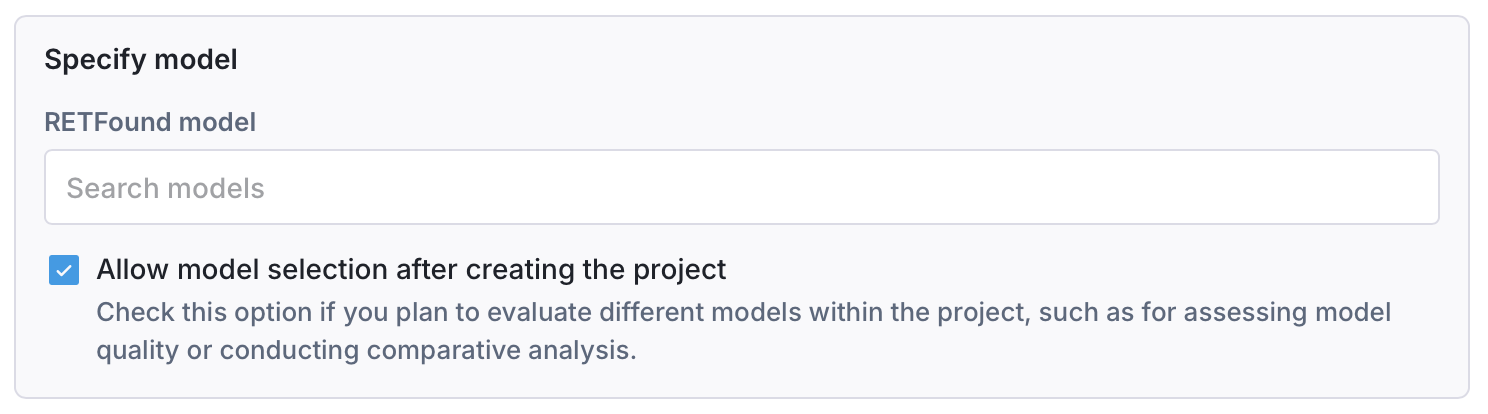
The model slug can be specified either at project creation time or at task runtime. At project creation time, you will be presented with an option to choose the model from a picker as well as the option to allow the user to then override this model at task runtime.
schema_column_name
Use a schema_column_name template when you want the user to choose a single column from their chosen dataset restricted by semantic type (for example categorical, continuous, image, or text). For instance, if you are working with an image model you may want to restrict the user to selecting only image columns.
template:
  target_column_name:
    label: "Target column"
    type:
      schema_column_name:
        semantic_type: image
schema_column_name_array
Use a schema_column_name_array template when the field you are templating takes an array of columns such as data_structure.select.include or data_structure.assign.image_cols.
template:
  feature_columns:
    label: "Feature columns"
    type:
      schema_column_name_array:
        semantic_type: continuous
task_filters
Use a task_filters template to allow users to configure data filtering criteria at task runtime. This presents a filter configuration UI where users can specify which data should be included based on file metadata, patient information, and imaging parameters.
template:
  data_filters:
    label: "Data filters"
    type: task_filters
    tooltip: "Configure filters to restrict which data is processed"
When referenced in the task, the filters are applied to data_structure.filter:
task:
  data_structure:
    filter: "{{ data_filters }}"
Task-level filters configured via templates are combined with any dataset-level filters set by the dataset owner at connection time. The resulting filter uses "most restrictive wins" logic—task filters can only further restrict the data, never expand it.
Available filter options include:
- Modality: OCT or SLO imaging modality
- B-scan frames: Minimum and maximum frame counts
- File size: Minimum and maximum file size in MB
- Date filters: File creation, modification, scan acquisition, and patient date of birth ranges
- Required fields: DICOM fields that must be present
- Series description: Filter by DICOM series description
See Task-level filters for the complete list of filter types and their value formats.
Referencing template variables
Use double curly braces within quotation marks to reference templated values:
task:
  protocol:
    name: bitfount.InferenceAndCSVReport
  algorithm:
    - name: bitfount.TIMMInference
      arguments:
        model_id: "{{ retfound_model }}"
        class_outputs: "{{ class_outputs }}"
        checkpoint_path: "{{ checkpoint_path }}"
    - name: bitfount.CSVReportAlgorithm
      arguments:
        original_cols:
          - _original_filename
          - Filename
  data_structure:
    select:
      include:
        - "{{ image_column_name }}"
    table_config:
      table: <replace-with-dataset-identifier>

template:
  test_run:
    type: boolean
    label: Test run
    default: false
    tooltip: >-
      Run the task with a small subset of data to test the configuration before
      running on the full dataset.
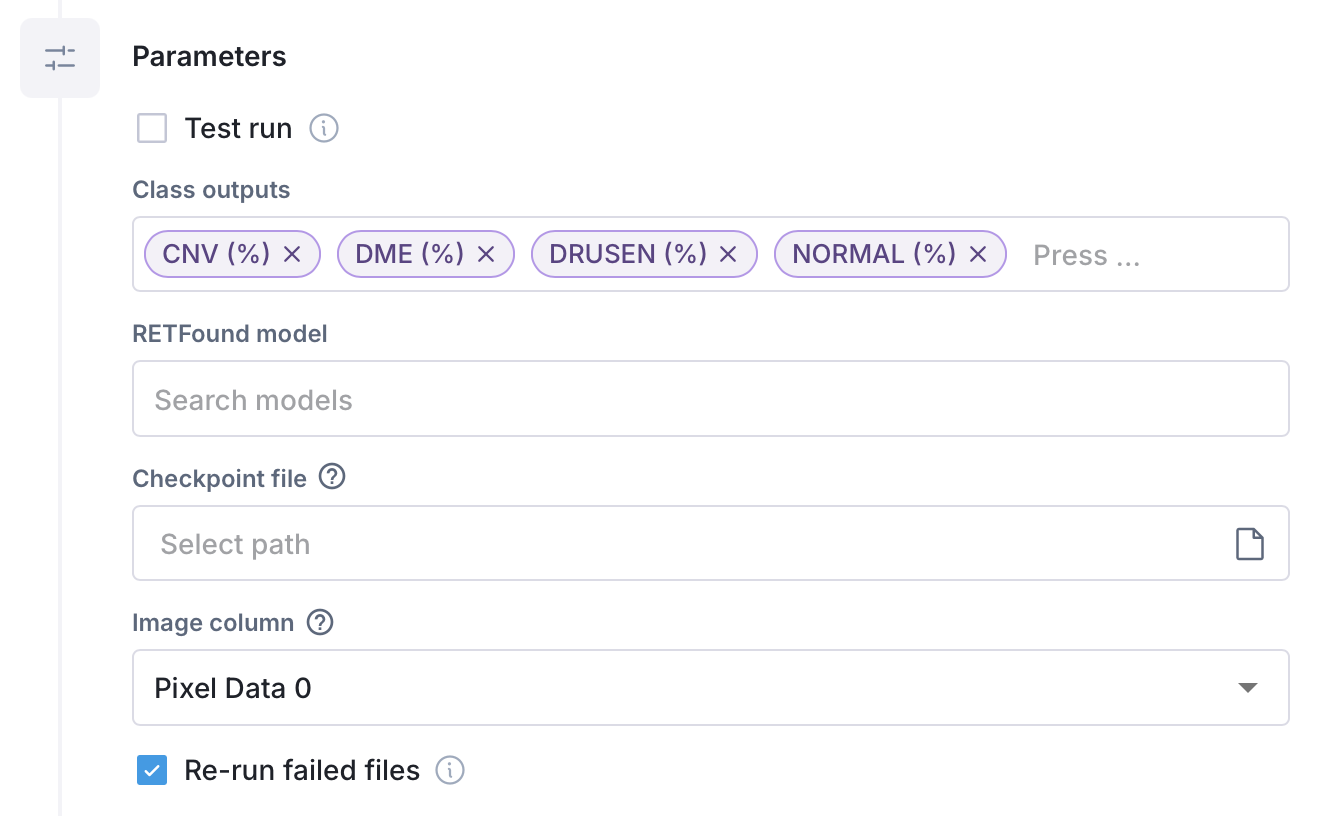
  class_outputs:
    type: array
    items:
      type: string
    label: Class outputs
    default:
      - CNV (%)
      - DME (%)
      - DRUSEN (%)
      - NORMAL (%)
    tooltip: >-
      The number of output categories for a classification task. Must match the
      number of labels.
    minItems: 1
  retfound_model:
    type:
      model_slug:
        author: bitfount
        library: timm
        provider: huggingface
    label: RETFound model
    tooltip: Select the RETFound model to be used in this task
  checkpoint_path:
    type:
      file_path:
        extension: tar
    label: Checkpoint file
    tooltip: >-
      Load a previously saved model checkpoint file to resume training from a
      previous state instead of starting from scratch.
  image_column_name:
    type:
      schema_column_name:
        semantic_type: image
    label: Image column
    default: Pixel Data 0
    tooltip: >-
      The dataset column that contains image data for model training and
      fine-tuning
  force_rerun_failed_files:
    type: boolean
    label: Re-run failed files
    default: true
    tooltip: >-
      Include files that failed in the last task run. Turn this off to skip
      them.
test_run: "{{ test_run }}"
force_rerun_failed_files: "{{ force_rerun_failed_files }}"
The above templated yaml would yield the following task configuration UI: